
A native desktop GUI
for Claude Code
Run, resume, search, and verify Claude Code sessions from one native workspace with a grid, terminal, preview pane, usage dashboards, and local transcript history.
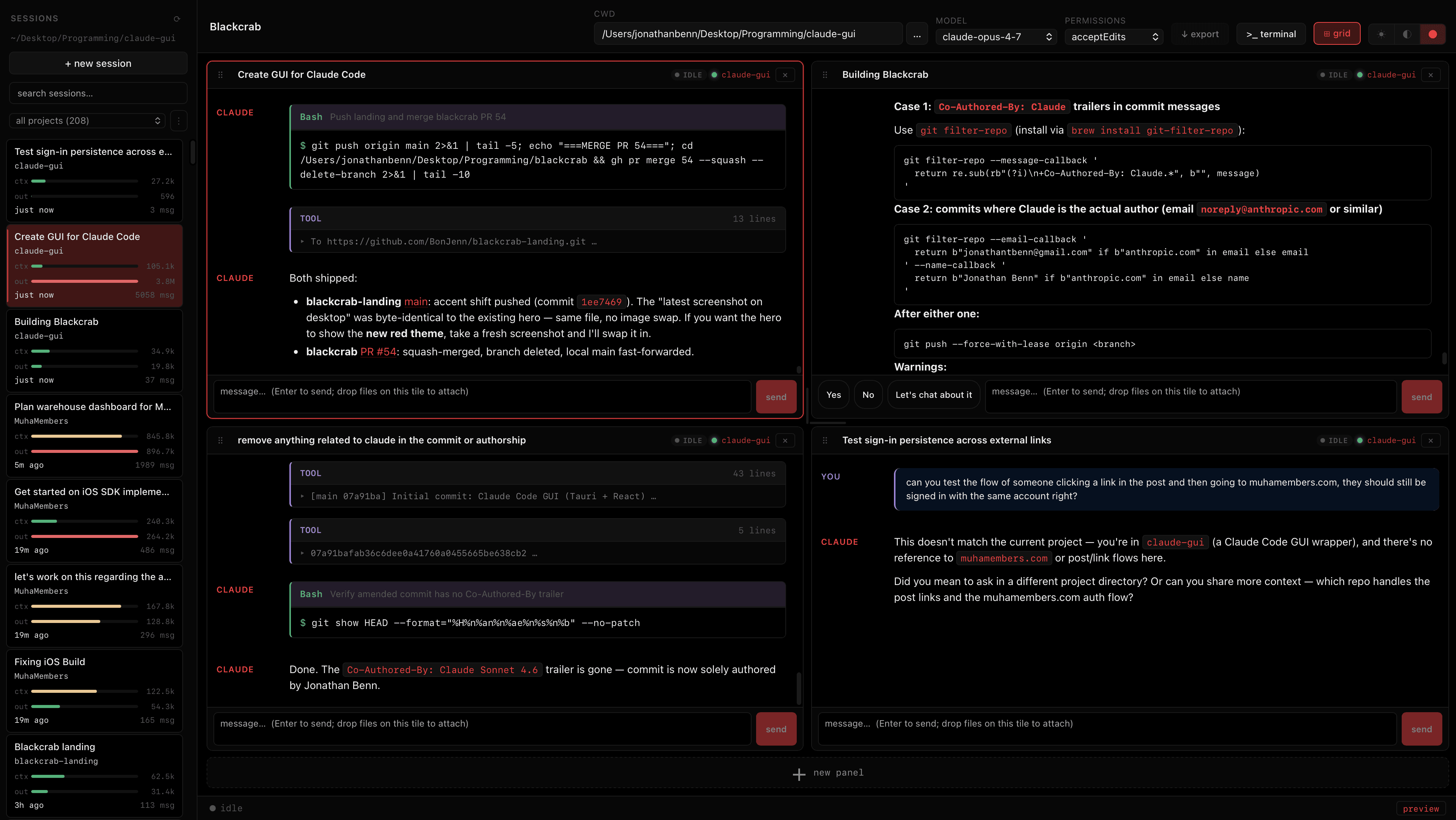
Your Claude Code history becomes a workspace.
Blackcrab indexes saved Claude Code JSONL files, groups sessions by project, and lets you resume, rename, archive, delete, search, and export conversations without digging through ~/.claude/projects.
See usage before it surprises you.
Every session tracks context, output tokens, and estimated cost. The usage dashboard rolls that up by day, month, project, model, and session, with CSV/JSON export and optional monthly budgets.
Keep parallel agent work out of each other's way.
Pin up to six live sessions, start new panels from the same repo, and let Blackcrab create git worktrees when a panel needs its own checkout. A branch picker keeps the current repo state visible in the header.
Terminal and preview stay attached to the task.
A PTY-backed terminal drawer, native side preview, local URL detection, and transcript link routing keep verification in the same window. Run the server, watch the page, and jump back to the agent without losing context.
Hand off GUI tasks when text is not enough.
Open an interactive Claude Code computer-use session, send a prepared handoff from the composer, and keep the sidecar terminal visible with /mcp controls when a task needs browser or desktop interaction.
The full Blackcrab surface.
The app is a local control surface for Claude Code: session history, live panels, verification tools, git context, usage reporting, and the setup details that make a desktop agent workflow reliable.
Global command palette
⌘K searches sessions, transcript text, and commands. Open settings, enter grid mode, check updates, jump to attention sessions, or launch dashboards from one picker.
Tileable session grid
Pin up to six live Claude Code panels. Each tile has its own subprocess, transcript, composer, model, permission state, scroll position, and focus shortcut.
Session library
Resume saved Claude Code sessions by title, project, model, date, or transcript hit. Rename, archive, delete, and export conversations as Markdown.
Project dashboard
Scan projects by active sessions, attention count, tokens, estimated cost, and recent activity, then open a session or start a new one from the project view.
Local analytics
Track tokens and estimated spend over 7, 30, 90 days, or all time. Break usage down by project, model, month, and recent sessions, then export CSV or JSON.
Usage budgets
Set monthly dollar or token budgets and get local warnings when current-month usage crosses the threshold.
Structured transcripts
Tool calls, diffs, command output, thinking blocks, permission prompts, stderr, diagnostics, and streaming text render as inspectable transcript blocks.
Git-aware panels
See the active branch, switch branches from the header, detect dirty worktrees, and isolate new grid panels with Claude Code's worktree mode.
Terminal drawer
Open a PTY-backed terminal with ⌘J, keep multiple tabs alive, resize the drawer, rename tabs, and verify work without leaving the app.
Native preview
Open local servers and external URLs in a side preview. Blackcrab can auto-detect localhost links from output and route transcript links into the preview.
Computer-use handoff
Launch an interactive Claude Code computer-use session or hand off the current composer task through the GUI action with /mcp helpers.
Composer attachments
Drop files, images, or screenshots onto the composer, manage multiple attachments inline, and type @ for file-path autocomplete.
Claude setup flow
Run setup checks, open the token setup path, store a Claude Code OAuth token in macOS Keychain, and avoid stale API-key conflicts in spawned sessions.
Models and permissions
Set defaults for new sessions, override model or permission mode per active session, and approve, deny, or retry permission prompts in context.
Attention management
Filter the sidebar to sessions that need attention, jump to the next one, and use notifications when a long turn finishes.
Desktop updates
The Tauri updater checks GitHub release artifacts, can install available updates, and reports anonymous updater health when analytics are enabled.
Local-first privacy
Core workflow data stays on disk with Claude Code. Optional app and updater analytics never include prompts, transcripts, paths, files, or tokens.
Custom workspace settings
Choose startup project, sidebar grouping, theme, auto-open preview, update checks, notifications, analytics sharing, and grid worktree behavior.
Keyboard-first when the mouse would slow you down.
The app keeps common actions close to the home row, and the command palette covers the rest.
Try Blackcrab.
Download the latest v0.2.0 desktop build for macOS, Windows, or Linux.